
Welcome to the new TCDev.de!
My page was offline for quite some time and desperately needed an update. I thought i'd do something new this time, something i didn't try yet. My community page https://www.madewithcards.io was up and running for quite a while, the internal blog module however was a bit of a mess and really needed to be replaced. I figured I did not want a seperate blog module for both pages and I also didn't want to use Wordpress or anything similar. So i decided to give ButterCMS a try, as a headless cms was pretty much what i needed to achieve what i wanted. A shared blog between both pages with the features i wanted to have.
The new TCDev.de is built with
- Vue + Vuetify (V2 as Vuetify isn't completely supported on V3 yet!)
- ButterCMS for content
- Github + Cloudflare Pages for hosting
- Prerender.io for SEO improvements
- .NET Core WebAPI for some API things I'm not talking about yet :)
First of all, what is ButterCMS? What is a headless CMS?
ButterCMS is an API-based or “headless” CMS, technically its a content management system as you might know it, Wordpress etc. However its fully API based. Headless here means, there's no "Head" aka Frontend for the CMS. Everything you do is purely accessible by using their API. In my case, exactly as i wanted. And a big plus.... ButterCMS has a free non-profit offering, you have to ask them for it and have to share a backlink on your page but hey, thats grant for awesome free functionality like this!
Starting with ButterCMS is quick and easy, sign up, take your API key, install the Vue SDK and you're pretty much done, the onboarding flow already gives you the first snippet you can use directly in the framework you're working with. Yes the guys give you snippets exactly for what you're using, they offer tons of Frameworks to chose from:
In my case i'm working with Vue. Getting started with ButterCMS takes seconds really. By just following the onboarding guide you already have a working blog. For me things where a bit different. I wanted more than a normal blog.
Blog posts with references and further links.
For the blog I had in mind i wanted to be able to have a section in the sidepane linking tech pieces used in the post. For example, when writing about Vue or AdaptiveCards i wanted to link these in the resources section. ButterCMS can do that pretty well with references, however these don't exist on the pre-made blog pages. Luckily you can add custom pages types which perfectly did the trick for me. Read more about custom page types here. Blog posts in ButterCMS are technically the same as the custom pages, its just a pre-made page type that pretty much resembled the blog post type and additionally added the fields I needed.
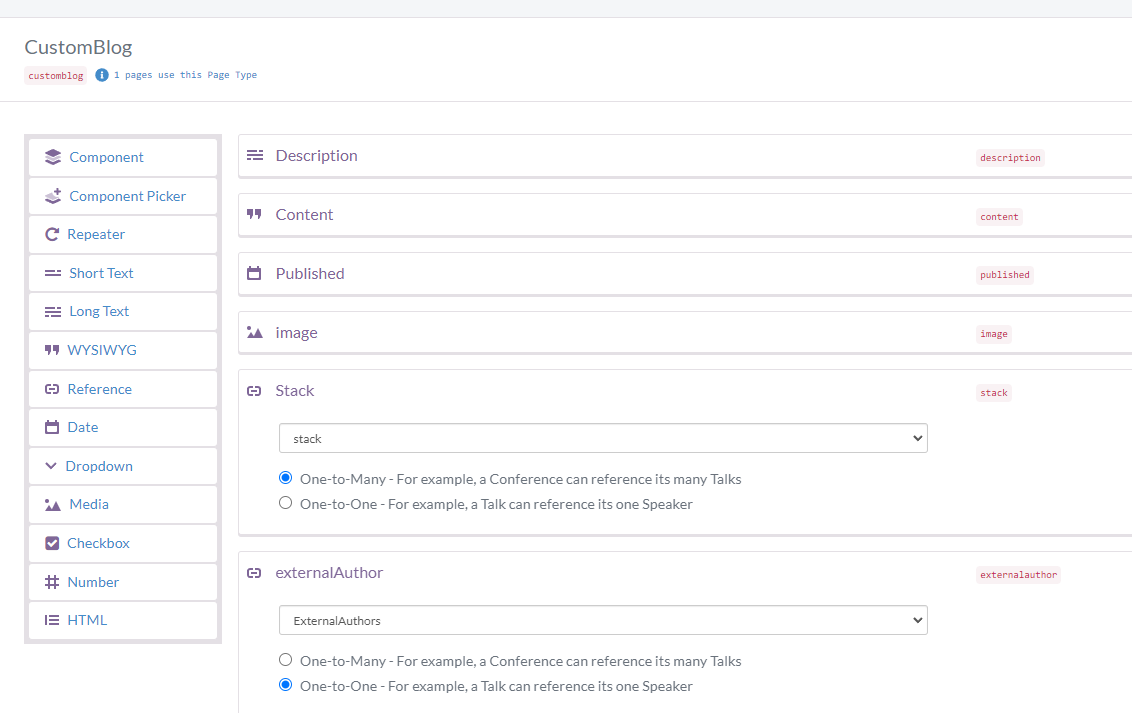
In my new "CustomBlog" page type I added a few references such as "Stack", "Category", "External Author" and a few more. These references are just custom collection types, another feature of ButterCMS. Think of it like custom collections where you define the fields, add items and use these in your posts and pages. As simple as that.
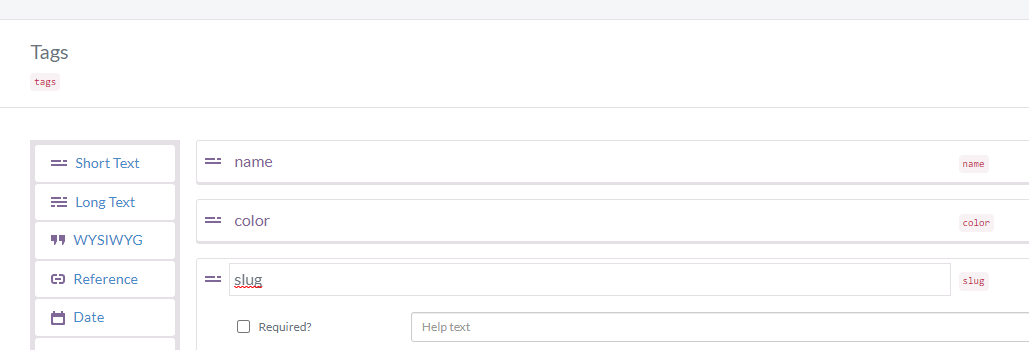
After all, despite needing a custom setup, things where still quick and smooth in ButterCMS. The UI is really handy, you never feel lost and setting it all up was done quickly.
Sharing a blog between two pages
As said before, I wanted to share the blog between both my MadeWithCards page and TCDev.de. Luckily as both are Vue pages I only had to write the template once and share it with both sources. There's only one difference. MadeWithCards is supposed to only show content either tagged with AdaptiveCards or in the AdaptiveCards category i added earlier. Thanks again to the lovely ButterCMS sdk this was also a matter of seconds to implement.
This is the code i'm using to fetch my posts, after fetching I group the posts by year for display purposes.
     butter.page
        .list('customblog',params)
        .then((res) => {
          const postGroups = []
res.data.data.forEach((post) => {
const group = postGroups.find((x) => x.name === moment(post.fields.published).format('yyyy'))
if (!group) postGroups.push({
name: moment(post.fields.published).format('yyyy'),
posts: [post]
})
else group.posts.push(post)
})
this.posts = postGroups.sort((p) => p.name).reverse()
})
The only thing thats different on MadeWithCards is the "params" part.
While TCDev is using these params:
      const params = {
        page: 1,
        page_size: 25,
        exclude_body: true,
        'filter.tags.slug': this.currentTag
      }
which is using a custom tag filter based on the currently selected tags on the page, MadeWithCards has the tags and category hardcoded:
      const params = {
        page: 1,
        page_size: 25,
        exclude_body: true,
        'filter.tags.slug': 'adaptive-cards',
        'filter.category.slug': 'adaptive-cards',
      }
As you can see in these two examples, the formentioned collections and all other fields I manually added to my page type are all filter and sortable!
Custom "Preview" protection
With ButterCMS you can easily preview your page while you're working on it and see it in your own page. Butter has a nice functionality for this. For me this wasn't enough. ButterCMS just applies a "preview=1" parameter and you're supposed to check this in your code and then display the preview. I wanted a way that at least is a bit more complex.
My custom blog page type has a field "preview-code" which is just a random number. When previewing the page the "&preview" param must match whats returned from ButterCMS API, otherwise the page can not be previewed. While this is not perfect its still good enough for me.
Including "external" posts
From time to time I want to add references to posts from other author's especially on MadeWithCards. I don't want to copy their content into a new post but also don't want to use any RSS feed as I want to pick manually which posts to add. Achieving this for me was pretty fast, again due to ButterCMS.
My custom blog type has 2 fields "isExternal" and "externalUrl" besides the reference to an author. Whenever i have an external post I add a new post, leave it completely empty and just fill out the title and externalXX fields besides adding a preview image maybe. By doing this I can render external and "internal" posts differently in Vue. While my own posts have a dedicated page to show the content and details, external posts are opened in a new tab using the externalUrl. Viewers can identify wether its my own or a shared post by checking the author and a huge "external" banner on the images.
Getting the page deployed and hosted.
I wanted to keep things as simple as I can, no hussle with any sort of webserver or cloud hosting. Just my static Vue page with the dynamic content from ButterCMS. Luckily there's a really easy way to do this. Github and Cloudflare Pages
Cloudflare Pages pretty much takes your Github code, deploys it to one of their servers and gives you a URL for it. Fully automatic and setup only takes a couple minutes. After the first deploy, every commit to the selected branch automatically re-deploys your code. Ci/CD made simple :)
I won't go into the details here as the documentation is already pretty good, just give it a read!
Improving SEO
As you might know, SPA's are a bit tricky when it comes to crawlers. Most of the content requires javascript to be executed and the page fully rendered to appear. There's various ways to achieve this. Server side rendering, Pre-rendered for crawlers and more. I decided to go the pre rendered route but instead of doing all of this myself I chose to use PrerenderIo. Its free for a set amount of cached pages and also plays nicely with Cloudflare using a Worker. Using Cloudflare with Prerender.io
With all this in place I was done for now and have my new page online, rest is adding content which I'll add tons more.
Stay tuned!